
Game Introduction
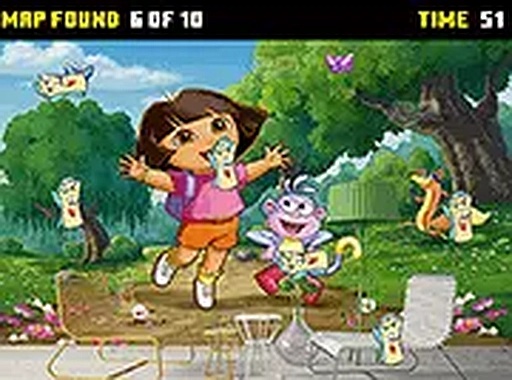
This browser-based puzzle activity invites children to accompany a beloved character on a quest to uncover hidden maps. Each scene presents a colorful, friendly environment where maps are tucked away in various spots. The experience is designed to be calm and encouraging, focusing on observation rather than speed or competition. Young players can explore at their own pace, with gentle hints available if needed. The game is free to play on desktop computers and requires no installation. It is suitable for all ages, with no intense or frightening elements. The core objective is to find all maps in a scene to move forward, promoting attention to detail in a stress-free setting.
How to Play
Players use a mouse to click on hidden maps within each illustrated scene. Maps may be partially visible or cleverly concealed among objects. A soft timer adds a mild sense of challenge, but the primary focus remains on careful searching. As players progress, scenes become slightly more complex, but the controls stay simple. This straightforward interaction makes the game accessible to young children and those new to puzzle games. The game runs smoothly on standard desktop computers with a keyboard and mouse.
Game Features
This game includes hidden object puzzles that encourage careful observation. Time-based elements provide a gentle challenge without causing frustration. The graphics are bright and cheerful, featuring familiar characters from a popular children's series. Simple point-and-click controls ensure ease of use for young players. Levels gradually increase in difficulty to maintain engagement. The game is free to play directly in a web browser, with no downloads or purchases required.
Tips for Success
Scan each scene slowly before clicking. Look for shapes or colors that stand out. Keep an eye on the timer, but do not rush. Practice regularly to improve your observation skills. If stuck, check the edges of the screen or behind larger objects. Staying calm and focused will help you find maps more efficiently.








Comments
0 comments