MultiRacer Hub

Details

Ashline Racing: Open Road Challenge

Ashline Racing: Open Road Challenge

Developer: Yard Shift Studio
Published: 2024-03-03
Updated: 2026-07-04
Driving Racing

Reviews

Ashline Racing: Open Road Challenge delivers a polished browser racing experience with no downloads. The WebGPU graphics ensure smooth performance, while the dual control modes accommodate both casual and experienced players. The open-world tracks with obstacles keep each run engaging. It is perfect for short gaming breaks or longer play.

About this game

Game Introduction

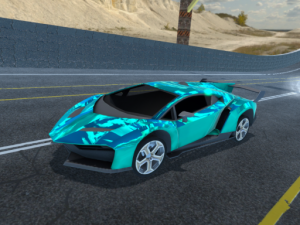
Ashline Racing: Open Road Challenge is a browser-based racing game that uses modern WebGPU technology for smooth visuals and seamless open-world streaming. Players can start racing immediately without any downloads or installations. The game offers two control modes to suit different play styles. In C-Drive Mode, the car accelerates automatically while you steer with A and D keys. In Manual Mode, you control acceleration with W and reverse with S. Both modes include boost with Shift and handbrake with Space. The dynamic tracks feature obstacles that require quick reactions and strategic path choices. This game provides a family-friendly racing experience with minimal setup and maximum action.

How to Play

To play Ashline Racing: Open Road Challenge, first select your control mode on the start screen. In C-Drive Mode, your car moves forward automatically. Use A and D to steer left and right. Press Shift to activate a speed boost. Use Space for a handbrake to make sharp turns. In Manual Mode, press W to accelerate, A and D to steer, and S to reverse. Shift still activates boost and Space applies the handbrake. Press P to switch between control modes during gameplay. Press Tab to pause the game. Left-click on buttons to navigate menus. Focus on avoiding obstacles while aiming for the finish line as quickly as possible.

Game Features

Instant browser play with no downloads required. WebGPU technology delivers smooth graphics and fast loading. Open-world streaming creates a seamless racing environment. Dual control modes allow players to choose automatic or manual driving. Family-friendly content suitable for all ages.

Tips for Success

Practice using both control modes to find which suits your driving style best. Use the handbrake for tight corners and the boost on straight sections for maximum speed. Stay alert for obstacles and plan your path ahead. Short practice sessions can help improve reaction times.
Compatibility

This H5 game runs smoothly on:
• Desktop computers (Windows / Mac) • Mobile phones (iPhone / Android)
• Tablets (iPad / Android)
🌐 Best experienced with Chrome, Safari, or Edge
Advertisement

Faq

Can I play Ashline Racing: Open Road Challenge on a mobile device?
The game is designed for browser play and may work on mobile browsers that support WebGPU, but it is optimized for desktop use with keyboard controls. Check your device compatibility for the best experience.
Is there a way to customize the car in Ashline Racing: Open Road Challenge?
The game focuses on immediate racing action without complex customization. Players can select control modes but the core experience is about driving through open-world tracks as quickly as possible.
Does Ashline Racing: Open Road Challenge have different track environments?
The game features dynamic tracks with obstacles that require quick reactions. While specific environments are not detailed, the open-world streaming suggests a variety of scenic routes may be available.
Can I compete against other players in Ashline Racing: Open Road Challenge?
The game is primarily a single-player racing experience focused on beating your own times and navigating tracks. Multiplayer features are not mentioned in the available information.
What happens if I hit an obstacle in Ashline Racing: Open Road Challenge?
Hitting obstacles may slow your car down or require you to recover your position. The game emphasizes quick reactions and strategic path choices to avoid these hazards and maintain speed.
Is there a tutorial for beginners in Ashline Racing: Open Road Challenge?
The start screen allows you to select your control mode, which serves as a basic introduction. The game is designed to be intuitive, so most players can begin racing immediately without a lengthy tutorial.

Leave a Comment