
Game Introduction
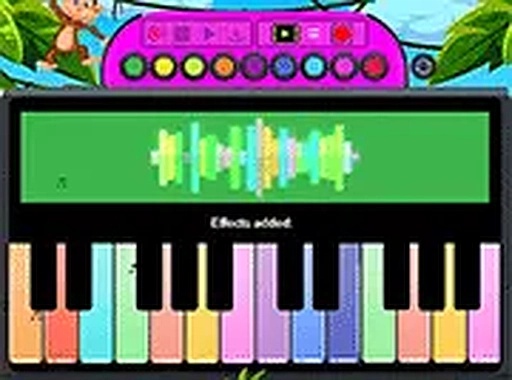
Kids Melody Piano Game is a browser-based musical activity designed for young children. It turns any screen into a friendly instrument where each tap produces a gentle sound. The main idea is to let children explore cause and effect—pressing a key creates a note, and different keys create different notes. There are no objectives to complete, no timers, and no right or wrong ways to play. This makes it a calm, pressure-free experience that encourages natural curiosity. The game is especially suitable for toddlers and preschoolers who are just beginning to understand how actions produce results. By offering a safe space for sound exploration, it supports early listening skills and an awareness of melody. Parents often appreciate that the game requires no setup or instructions—children can start playing immediately. The simple design focuses on the joy of making sounds, without any distracting elements. This approach helps build a positive first impression of music and creativity.
How to Play
Playing the game is straightforward. On a touchscreen device, children tap the colored keys with their fingers. On a computer, they click each key using a mouse. Each action produces a musical note. There are no levels to advance through or goals to achieve. Players can press keys in any order, at any speed, to create sounds. The keys are large and clearly visible, making them easy for small hands to target. Children can play alone or with a parent or sibling. The open-ended nature means every session is unique—no two play experiences need to be the same. This simplicity helps children focus on listening and experimenting.
Game Features
Features include brightly colored keys that are easy to see and tap, support for both touch and mouse input, and a completely open-ended environment with no scores or timers. The game runs directly in a web browser without requiring any downloads or account creation. It works on mobile phones, tablets, and desktop computers. A full-screen mode is available to help children focus. The game is free to play and contains no advertisements or in-app purchases. Its design emphasizes simplicity and accessibility, making it suitable for very young children who are new to digital devices.
Tips for Success
Encourage children to press keys slowly at first to hear each note clearly. Let them explore without direction—this builds confidence and listening skills. For shared play, take turns pressing keys to create simple patterns. Use full-screen mode to reduce visual clutter. Short, regular sessions help maintain interest and support fine motor development.








Comments
0 comments